Sky Port
Sky Port is an open-source, vendor-independent workload manager for HPC. It connects user software to cloud compute: submit a job, and Sky Port provisions the cluster, configures port forwarding, moves data, runs containers, monitors progress, and tears resources down when the work is done.
Open Workload is the community behind Sky Port.
Quick start · Try Jupyter · Source on GitHub
Why Sky Port
- One workflow: no separate steps to create VMs, forward ports, sync files, and clean up afterward.
- You choose the resources: pick flavors and images (you pay the cloud provider directly).
- Replaceable edges — Terminals and Gates speak documented APIs, so third parties can add user interfaces or cloud backends without forking the core.
- Certificate-based trust — Terminals, Core, and Gates authenticate with mutual TLS (certificates under
~/.swm), not shared passwords.
Quick start
Pull the release container (Core + cloud gate):
docker pull openworkload/skyport:latest
From a swm-core checkout, bootstrap and start:
make start-release-container
# Configure Azure credentials, then:
docker start skyport
Azure setup: AZURE.md. Install and build details: INSTALL.md.
Talk to a running Core with the console terminal:
pip install swmconsole
swmconsole --help
swmconsole --job-list
How you use it
- Interactive notebooks: Jupyter terminal (
swmjupyteron PyPI) spawns JupyterLab on cloud VMs through Sky Port. - Batch / scripted jobs: write a
#SWMjob script and submit with swmconsole. - Custom terminals: build against the Python client (
swmclienton PyPI) and the Core REST API. - Your own cloud gate: implement a Gate for your compute resources (Azure is the reference integration today).
Job script sketch
#!/bin/bash
#SWM name example-job
#SWM nodes 1
#SWM flavor Standard_D4s_v3
#SWM cloud-image ubuntu-22.04
#SWM container-image ubuntu:22.04
#SWM input-files data.dat
#SWM output-files results.out

./run_my_workload.sh
Directives cover nodes, GPUs, flavors, images, file transfer, and port forwarding. Full reference: JOB_DIRECTIVES.md.
Current status
Sky Port is alpha. APIs are still stabilizing.
Available today
- Full cloud job lifecycle (submit, schedule, provision, transfer, run, monitor, tear down).
- Microsoft Azure as the primary remote site.
- Multi-node and GPU job directives.
- Containerized jobs.
- Console and Jupyter terminals; Python client on PyPI.
- Release image:
openworkload/skyport:latest
Limited / in progress
- MPI integration
- Validation focused on recent Ubuntu on x86_64 (ARM64 and other distros are best-effort)
Planned
- Accounting
- Checkpoints
- Broader cloud-provider coverage and platform validation
Software stack
| Component | Repository | Role |
|---|---|---|
| Core | swm-core | Workload manager daemon; Terminal ↔ Gate orchestration |
| Scheduler | swm-sched | Scheduler plugin; builds execution timetables |
| Gate | swm-cloud-gate | Cloud provider integration (Azure) |
| Jupyter terminal | swm-jupyter-term | JupyterHub spawner for Sky Port jobs |
| Console terminal | swm-console-term | CLI for jobs, flavors, images, and remotes |
| Python client | swm-python-client | Wrapper around the Core REST API |
Design
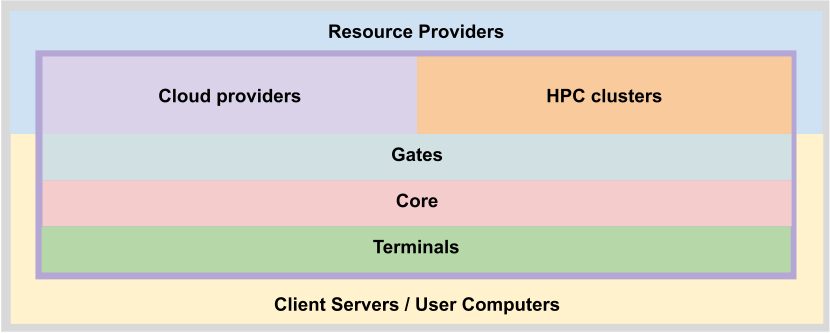
Sky Port separates Terminals (user-facing clients), Core (orchestration), and Gates (cloud connector plugins). Clear APIs mean you can swap or extend edges for a specific workflow or provider without rewriting the manager.
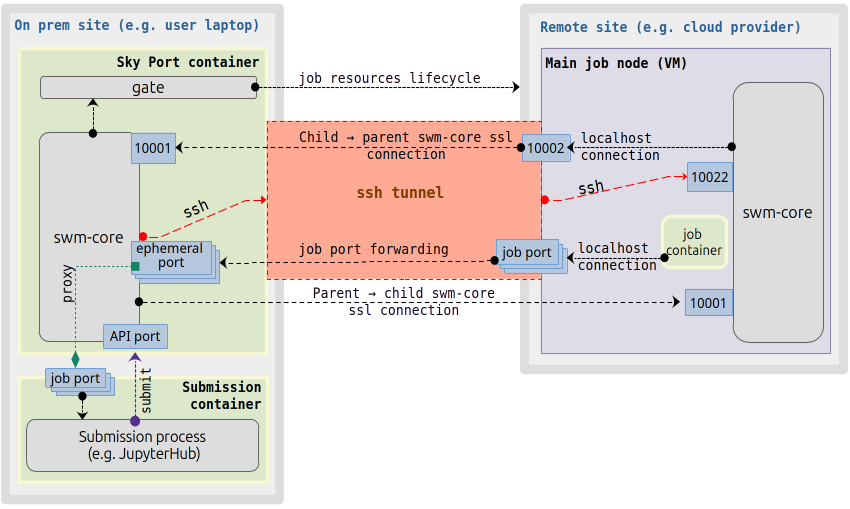
Connections between terminal, core, gate, and cloud provider:
Supported platforms
Sky Port targets Linux on ARM64 and x86_64. A reasonable effort is made across major modern distributions, but validation is currently limited to recent Ubuntu on x86_64.
Docs and contributing
Bug fixes are welcome without prior discussion. For new features, gates, or terminals, open an issue first.
Software is licensed under BSD-3-Clause. Code of conduct.